1:1 OEM-to-OCM Replacement Matching System
The Problem
Customers searching for OEM (Original Equipment Manufacturer) parts on our website had no clear way to identify that Mavrik parts (Original Component Manufacturer) were exact replacements. This created friction and uncertainty—customers couldn’t confidently purchase alternatives, even when they were perfect matches. Additionally, the page experience was cluttered with distracting elements that reinforced this uncertainty.
From a business perspective, we were leaving money on the table by not clearly communicating that Mavrik parts could be priced individually based on OEM compatibility.
The Approach
Rather than overhaul the entire system at once, we designed a phased rollout to test customer response and refine our approach. Phase 1 focused on creating clear visual and informational distinctions between OEM and Mavrik product pages, while handling the complexity of both 1:1 matches (one Mavrik part replaces one OEM part) and 1:M matches (one Mavrik part replaces multiple OEM parts).
Phase 1: Design Changes
Product Detail Pages (PDP)
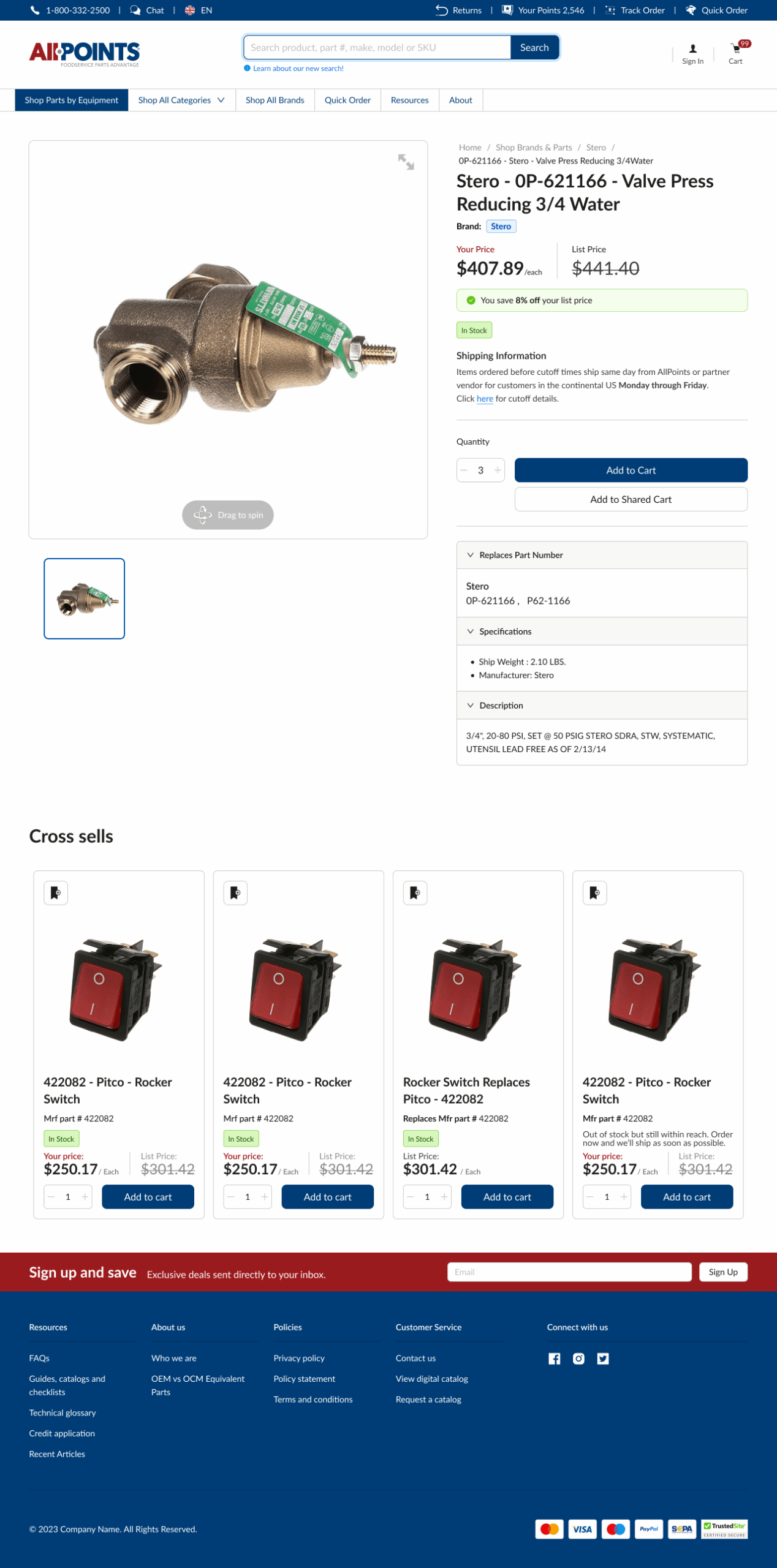
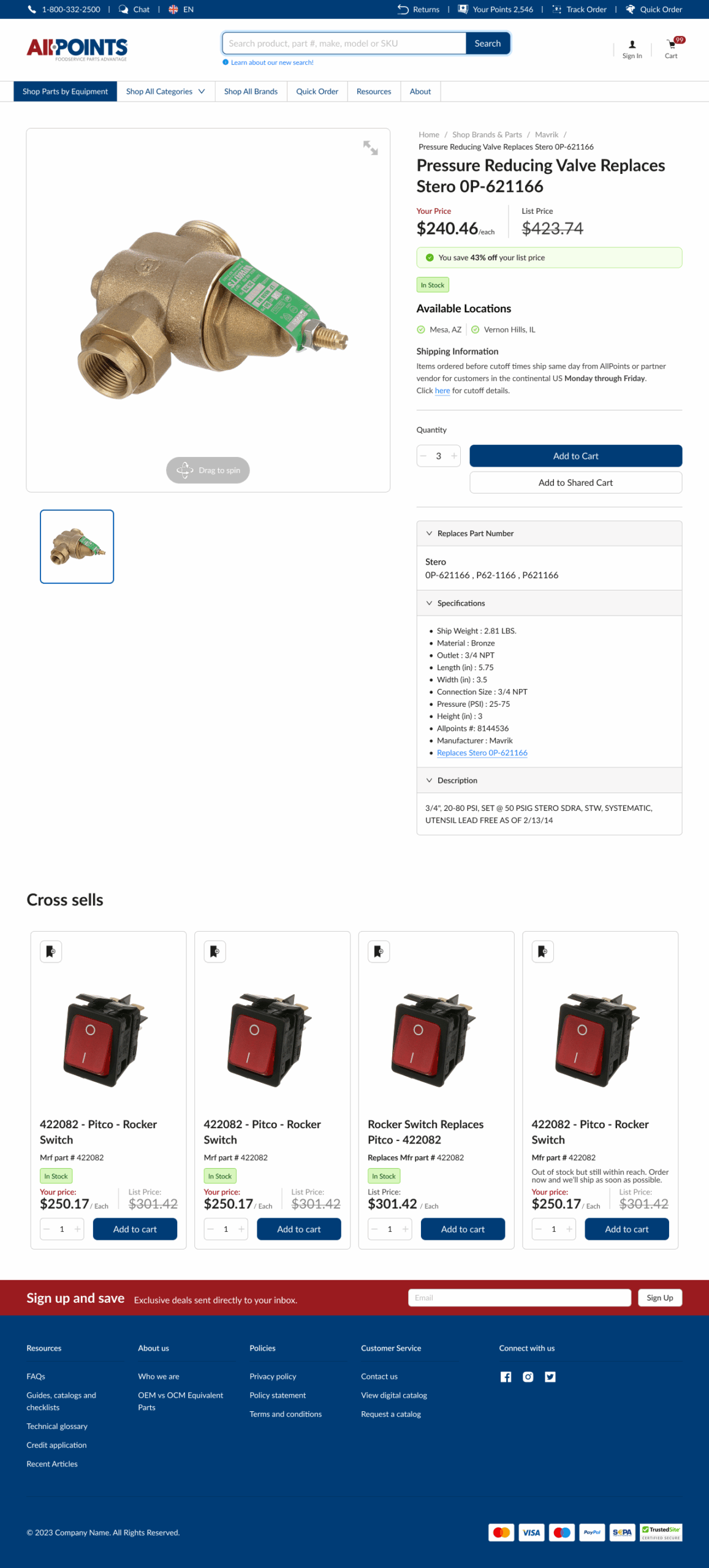
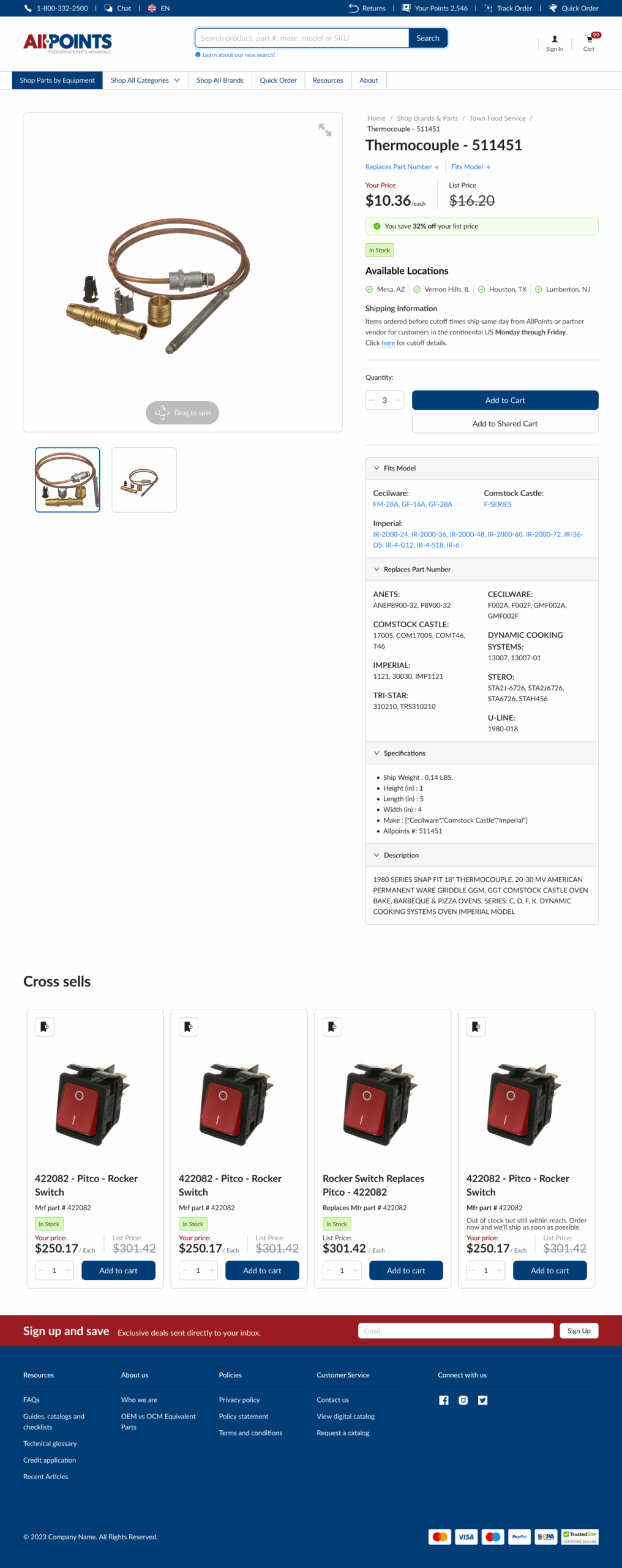
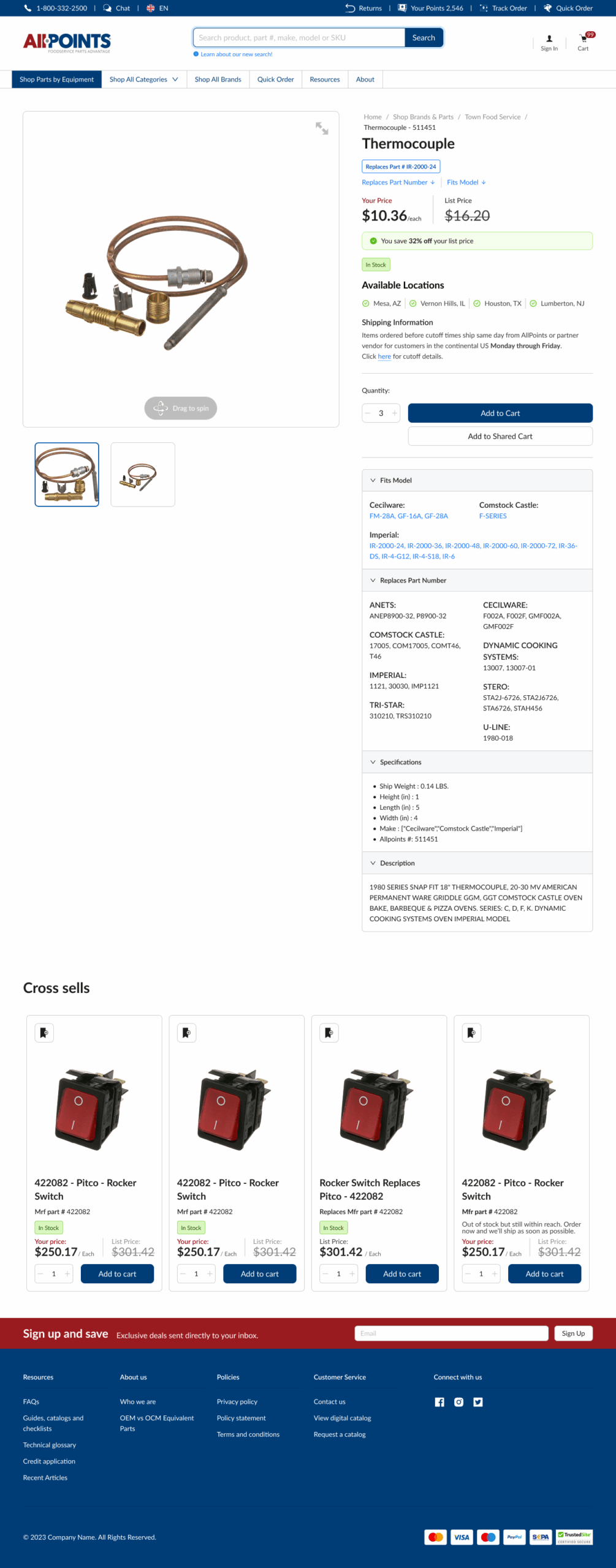
Four distinct layouts were designed to handle different scenarios:
- OEM Part Page — Standard OEM part display
- 1:1 OCM Part Page — De-emphasized Mavrik branding to highlight the exact manufacturer match (if a customer searches for a Blodgett part, they see the Blodgett connection, not Mavrik)
- 1:M OCM Part Page (Part # Search) — Shows that one Mavrik part replaces multiple OEM parts with a compatibility badge to highlight the match
- 1:M OCM Part Page (General Visit) — Shows one Mavrik part replaces multiple OEM parts without the search-specific badge
Common improvements across all layouts:
- Removed brand-specific information that wasn’t relevant to part compatibility
- Reformatted H1 heading to prominently display manufacturer part number with “Replaces” language, making the connection explicit
- Removed AllPoints SKU numbers that added no value to the customer experience
- Added direct OEM links within product specifications, keeping the original part findable for reference
Product List Pages (PLP) & Category Pages
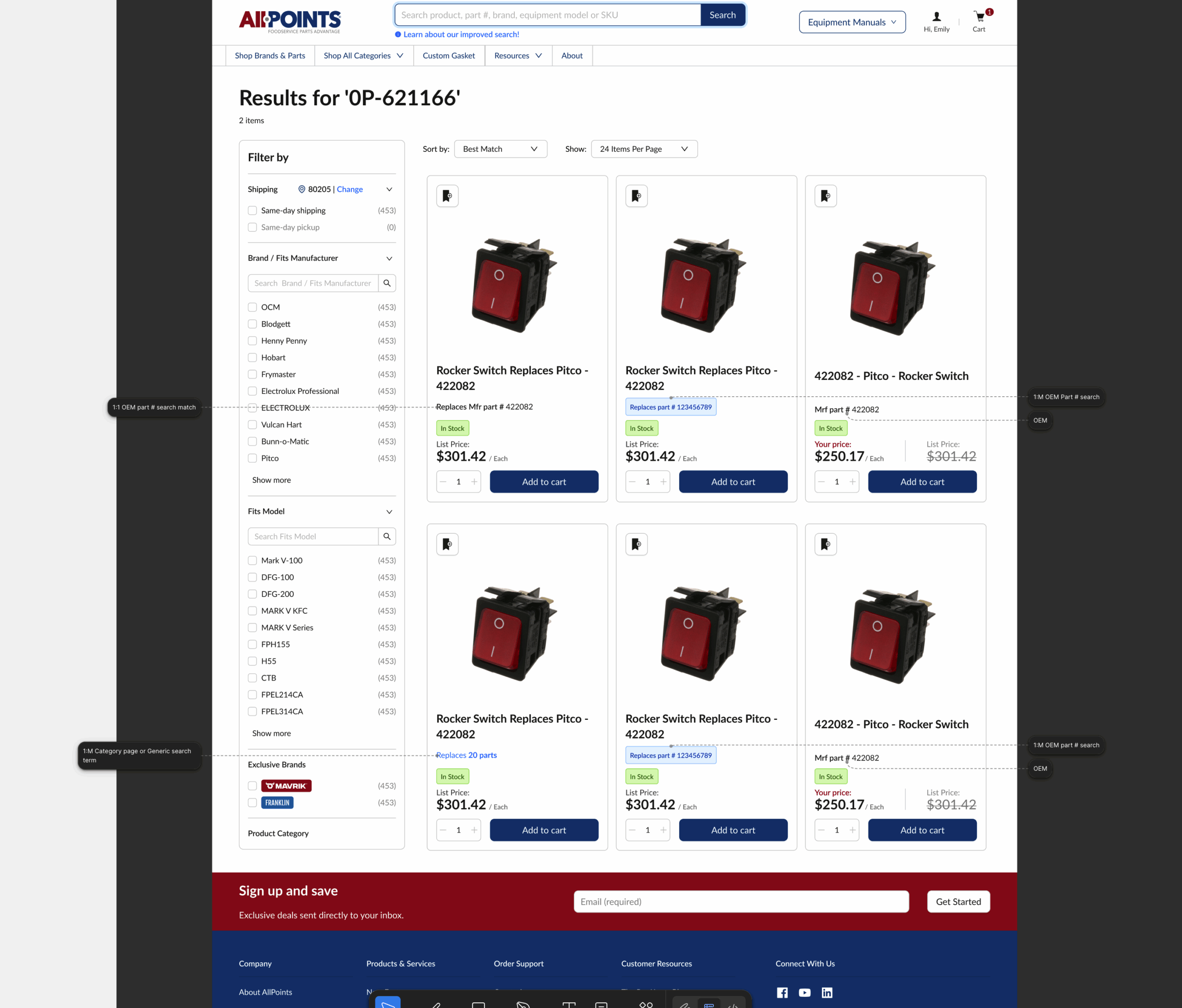
Created dynamic displays based on search context:
- 1:1 OEM match — Shows “Replaces Mfr part # [XXXXX]” as the part number
- 1:M OEM match — Displays replaces badge without cluttering the part number field
- Standard OEM search — Shows normal manufacturer part number display
- 1:M Category or generic search — Shows “Replaces X parts” to indicate broader compatibility
Outcome
Phase 1 went live with a controlled rollout of 1:1 compatibility to properly gauge customer response before expanding to full coverage. This phased approach allowed us to validate customer behavior around the new Mavrik experience while refining the design based on real usage data before investing in the complete system.
Key Learnings
- Phased rollout reduces risk and provides data to inform future phases
- Clarity around part compatibility directly impacts customer confidence in alternative products
- De-emphasizing brand (even your own) when it creates confusion improves UX
- Handling multiple match types (1:1 vs 1:M) requires thoughtful information architecture to avoid overwhelming users
Phase 2 & Beyond
Phase 2 will expand to full 1:1 compatibility rollout across all applicable parts. Additionally, downstream designs will ensure consistent part number display throughout the customer journey—from cart and mini-cart to checkout, order confirmation, and order history—creating a seamless experience that reinforces the part matching system across all touchpoints.